Gunakan pascapilihan dalam beban kerja
Versi pakej
Kod di halaman ini dibangunkan menggunakan keperluan berikut. Kami syorkan menggunakan versi ini atau yang lebih baru.
qiskit[all]~=2.5.2
qiskit-ibm-runtime~=0.47.0
qiskit-addon-utils~=0.4.0
Semasa mengoptimumkan strategi pengurangan ralat beban kerja, sering berguna untuk menapis ukuran yang diketahui telah dicemari oleh proses hingar bukan-Markov (berkorelasi). Salah satu kaedah untuk melakukannya melibatkan menambahkan Circuit dengan langkah pasca-pemprosesan yang mengukur qubit aktif dan "penonton" bersebelahan, menerapkan putaran perlahan kepada setiap qubit, dan kemudian mengukurnya semula. Dalam kes di mana dua ukuran tidak mengesahkan qubit yang dibalikkan seperti yang dijangkakan, tembakan dibuang dengan menerapkan topeng kepada keputusan.
Pakej utiliti tambahan Qiskit menyediakan set laluan transpiler dan fungsi pascapilihan untuk menerapkan topeng. Halaman ini memberikan panduan tentang cara menggabungkan pascapilihan ke dalam beban kerja kuantum anda dengan menggunakan keadaan GHZ empat-Qubit sebagai contoh.
Cipta beban kerja
Mulakan dengan menyediakan Circuit untuk dilaksanakan dan ditransail terhadap Backend yang menyokong gate pecahan.
# Added by doQumentation — required packages for this notebook
!pip install -q qiskit qiskit-addon-utils qiskit-ibm-runtime
from qiskit_ibm_runtime import QiskitRuntimeService
from qiskit.circuit import QuantumCircuit
from qiskit.transpiler import generate_preset_pass_manager

circuit = QuantumCircuit(4)
circuit.h(0)
circuit.cx(0, 1)
circuit.cx(1, 2)
circuit.cx(2, 3)
circuit.measure_all()

service = QiskitRuntimeService()
backend = service.least_busy(use_fractional_gates=True)
pm = generate_preset_pass_manager(optimization_level=3, backend=backend)

transpiled_circuit = pm.run(circuit)
transpiled_circuit.draw("mpl")
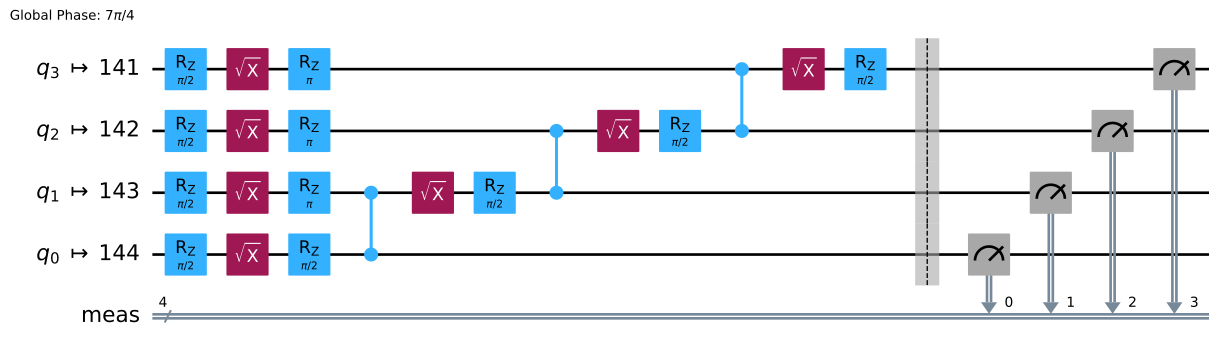
Tambah laluan transpiler pascapilihan
Seterusnya, cipta pengurus laluan pratetap yang merangkumi laluan AddPostSelectionMeasures dan AddSpectatorMeasures dari pakej qiskit-addon-utils. Ini akan menambahkan Circuit dengan urutan putaran RX sudut kecil (secara efektifnya menghasilkan gate X yang panjang) bersama set ukuran kedua.
from qiskit.transpiler import PassManager
from qiskit_addon_utils.noise_management.post_selection import PostSelector
from qiskit_addon_utils.noise_management.post_selection.transpiler.passes import (
    AddPostSelectionMeasures,
    AddSpectatorMeasures,
)

post_selection_pm = PassManager(
    [
        AddSpectatorMeasures(backend.coupling_map, add_barrier=True),
        AddPostSelectionMeasures(x_pulse_type="rx"),
    ]
)

template_circuit_ps = post_selection_pm.run(transpiled_circuit)
template_circuit_ps.draw("mpl", fold=-1, idle_wires=False)
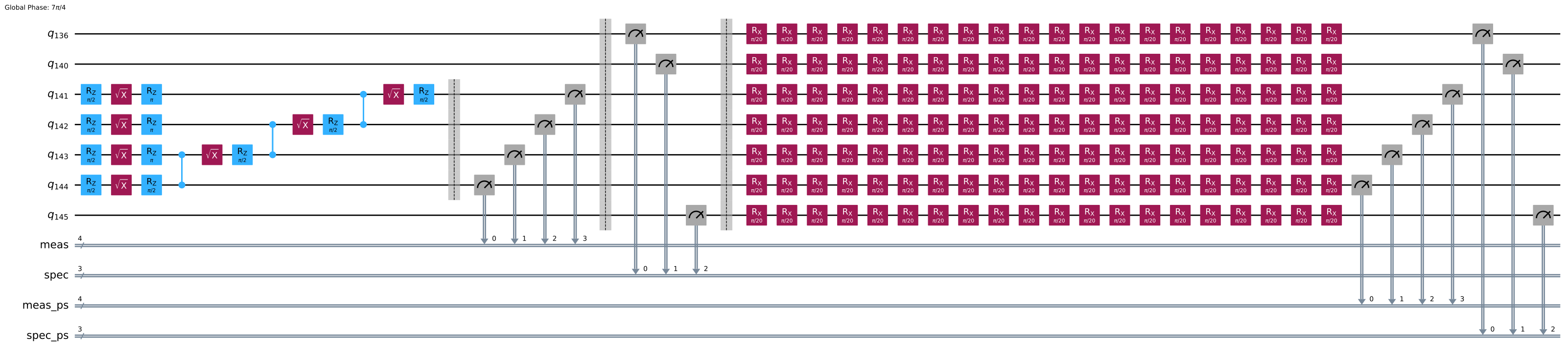
Laksanakan program kuantum
Seterusnya, sediakan objek QuantumProgram yang mengandungi Circuit yang akan dilaksanakan.
from qiskit_ibm_runtime import QuantumProgram, Executor

shots = 4000

program = QuantumProgram(shots=shots)
program.append_circuit_item(template_circuit_ps)

# Initialize the Executor job and run
executor = Executor(backend)
executor_job = executor.run(program)
print(f"Job ID: {executor_job.job_id()}")
Job ID: dab7lmhl216s739p6q1g
Sekarang anda boleh mentafsir keputusan. Keputusan executor adalah kamus dengan beberapa kunci.
executor_result = executor_job.result()[0]
executor_result.keys()
KeysView(QuantumProgramItemResult({'meas': array([[ True,  True,  True,  True],
       [ True,  True,  True,  True],
       [False, False, False, False],
       ...,
       [ True,  True,  True,  True],
       [ True,  True,  True,  True],
       [False, False, False, False]], shape=(4000, 4)), 'spec': array([[False, False, False],
       [False, False, False],
       [False, False, False],
       ...,
       [False, False, False],
       [False, False, False],
       [False, False, False]], shape=(4000, 3)), 'meas_ps': array([[False, False, False, False],
       [False, False, False, False],
       [ True,  True,  True,  True],
       ...,
       [False, False, False, False],
       [False, False, False, False],
       [False,  True,  True,  True]], shape=(4000, 4)), 'spec_ps': array([[ True,  True,  True],
       [ True,  True,  True],
       [ True,  True,  True],
       ...,
       [ True,  True,  True],
       [ True,  True,  True],
       [ True,  True,  True]], shape=(4000, 3))}, metadata=ItemMetadata()))
Kunci-kunci ini sepadan dengan qubit aktif dan penonton sebelum arahan rx (meas dan spec) dan selepas arahan rx (meas_ps dan spec_ps). Setiap satu ini adalah tatasusunan tatasusunan berdasarkan bilangan tembakan dan qubit. Dalam kes ini, bentuknya adalah (1000, 4).
Cipta topeng pascapilihan
Dari ukuran-ukuran ini, anda boleh membuat topeng menggunakan kelas PostSelector dari qiskit-addon-utils. Topeng ini adalah tatasusunan boolean di mana setiap tembakan ditanda sebagai True atau False berdasarkan salah satu daripada dua strategi pascapilihan. Strategi pertama, node, menggunakan maklumat qubit untuk memutuskan sama ada tembakan ukuran harus dibuang — dan yang kedua, edge, menggunakan maklumat ketersambungan jiran terdekat untuk membuat keputusan ini.
post_selector = PostSelector.from_circuit(
    circuit=template_circuit_ps, coupling_map=backend.coupling_map
)

mask_node = post_selector.compute_mask(executor_result, strategy="node")
mask_edge = post_selector.compute_mask(executor_result, strategy="edge")
Kedua-dua strategi nod dan tepi sering membuang tembakan yang berbeza. Anda boleh memilih mana-mana satu daripadanya. Buku nota ini mengambil AND bitwise, yang merupakan strategi konservatif yang mengekalkan tembakan hanya jika ia lulus oleh kedua-dua strategi nod dan tepi.
mask = mask_node & mask_edge
print(f"The combined mask: {mask}")
count_retained = 0

for m in mask:
    count_retained += m

print(
    f"Percentage of the shots retained is after post selection "
    f"{100 * count_retained / shots}"
)
The combined mask: [ True  True  True ...  True  True False]
Percentage of the shots retained is after post selection 83.3
Bandingkan taburan kebarangkalian dengan dan tanpa pascapilihan. Petikan berikut mengira taburan kebarangkalian sebelum dan selepas pascapilihan, serta jarak antara taburan yang diukur dan ideal.
counts = {}
counts_ps = {}

for idx, measurement in enumerate(executor_result["meas"]):
    bitstring = ""
    for bit in measurement:
        bitstring += str(int(bit))

    if bitstring in counts:
        counts[bitstring] += 1
    else:
        counts[bitstring] = 1

    # Compute count data for postselected shots based on the mask
    if mask[idx]:
        bitstring = ""
        for bit in measurement:
            bitstring += str(int(bit))

        if bitstring in counts_ps:
            counts_ps[bitstring] += 1
        else:
            counts_ps[bitstring] = 1

for key, val in counts.items():
    counts[key] = val / shots

for key, val in counts_ps.items():
    counts_ps[key] = float(val / count_retained)
Untuk menunjukkan bagaimana pascapilihan mengubah keputusan anda, kira jarak antara taburan kebarangkalian ideal dan yang diukur.
import itertools
from qiskit.visualization import plot_histogram

bitstrings = ["".join(i) for i in itertools.product("01", repeat=4)]
counts_ideal = {}
for bitstring in bitstrings:
    counts_ideal[bitstring] = 0.0
counts_ideal["1111"] = 0.5
counts_ideal["0000"] = 0.5

prob_distance = 0.0
prob_distance_ps = 0.0

for bitstring in counts_ideal.keys():
    dist = 0.0
    dist_ps = 0.0
    if bitstring in counts:
        dist = abs(counts[bitstring] - counts_ideal[bitstring])
    if bitstring in counts_ps:
        dist_ps = abs(counts_ps[bitstring] - counts_ideal[bitstring])
    prob_distance += dist
    prob_distance_ps += dist_ps

print(
    f"Distance from ideal distribution before postselection: "
    f"{1-prob_distance*0.5}"
)
print(
    f"Distance from ideal distribution before after-selection: "
    f"{1-prob_distance_ps*0.5}"
)

plot_histogram([counts, counts_ps], legend=["Normal", "Post selected"])
Distance from ideal distribution before postselection: 0.9385
Distance from ideal distribution before after-selection: 0.9315726290516206
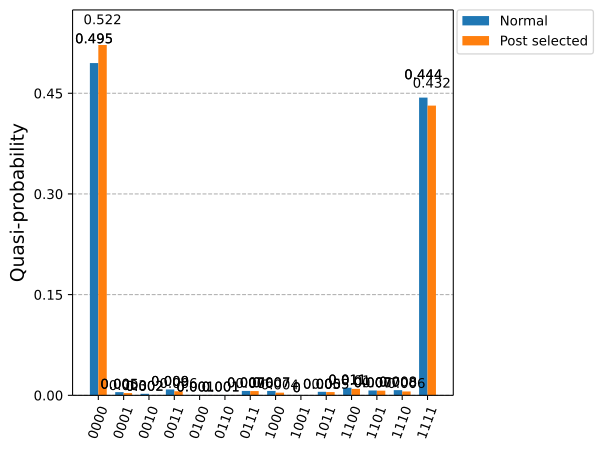
Walaupun pascapilihan dapat meningkatkan kualiti keputusan dengan ketara dengan menapis ukuran hasil yang dipengaruhi oleh hingar bukan-Markov, ia bukan penyelesaian lengkap untuk pengurangan ralat dengan sendirinya. Pascapilihan mengurangkan impak ralat tertentu dengan membuang keputusan ukuran yang tidak sah, tetapi ini datang dengan kos overhed pensampelan yang meningkat dan tidak menangani semua mekanisme ralat yang wujud dalam perkakasan kuantum jangka pendek. Hasilnya, kemungkinan besar tidak mencukupi untuk bergantung semata-mata pada pascapilihan untuk Circuit yang lebih kompleks atau lebih dalam. Sebaliknya, pascapilihan paling berkesan apabila digunakan sebagai sebahagian daripada strategi pengurangan ralat yang lebih luas — melengkapi teknik seperti pengurangan ralat ukuran, kompilasi Circuit sedar-hingar, atau pembatalan ralat kebarangkalian — untuk meningkatkan kebolehpercayaan beban kerja kuantum sambil mengimbangi ketepatan dan kos sumber.
Langkah seterusnya
- Fahami cara menggabungkan pembelajaran hingar ke dalam beban kerja kuantum.
- Baca teknik pengurangan ralat dan penindasan ralat lain yang tersedia.
- Ketahui cara menggunakan kod ruang-masa untuk pendekatan overhed rendah bagi pengesanan ralat